
Remove background from image
Remove a photo’s background and download a transparent PNG.
This browser or device has no usable WebGPU, so only Fast mode (runs on the CPU, rougher edges) is available. The colour tools below also work: pick the background colour or the magic wand.
The image never leaves your computer.
Load an image to start editing.
Background removal
Automatically (AI)
Local AI. Initial engine and model: about 19 MB for Fast, 125 MB for Standard or 142 MB for 1024 px, plus application files. Cached when storage is available. Your photo is not uploaded.
By colour
Click a background color or use the magic wand to make it transparent.
How to remove a background
- Click Open image, drop a photo on the box above or paste one with Ctrl+V.
- AI starts automatically. The first run downloads the engine and model; time depends on your device and connection. Files are cached when storage is available.
- Start with Standard 512. The 1024 px option needs more resources and may switch to Standard if its mask is uncertain.
- Keep the transparent background, or choose a colour and press Fill background for a white or coloured one.
- Download the PNG at the processed dimensions. Images above 64 MP or 32767 px on a side are reduced.
What people use it for
- Product photos for an online shop or marketplace on a clean white background.
- Profile pictures and portraits without a messy room behind them.
- Logos and signatures photographed on paper, turned into a transparent PNG.
- Stickers, collages and thumbnails where the subject sits on a new background.
- Pets, cars and objects cut out for presentations and school projects.
How the AI cut-out works
BiRefNet runs locally through WebGPU. Its 512 or 1024 px mask is scaled to the processed image. The first engine and model download is about 125 MB for Standard or 142 MB for 1024 px, plus application files. Cache storage may be unavailable or cleared. Fast mode runs U²-Net-P (Qin et al., Apache-2.0; ONNX conversion from the rembg project by Daniel Gatis) on the CPU: about 19 MB in total with its engine, with softer results on hair and portraits.
Questions about removing backgrounds
Is this background remover really free?
Yes: no account, watermark or charge. Processing is limited by your device's memory and canvas dimensions.
Is my photo uploaded to a server?
Your photo stays on your device. Only application files, the engine and model are downloaded: about 125 MB for Standard or 142 MB for 1024 px, plus the application. Files are cached when storage is available.
Which browsers can run it?
Standard and 1024 px need a working compatible WebGPU adapter and enough memory. Fast mode (about 19 MB) runs on any modern browser without WebGPU, with lower quality on hair and portraits. A browser name alone does not guarantee WebGPU support. The manual colour tools remain available.
How do I get a white background?
After the background is gone, keep white in Background colour, press Fill background and download. Any other colour works the same way, which helps with shop listings and ID-style photos.
Why are some edges not perfect?
Fine hair, glass, smoke and similar foreground/background colours may need manual cleanup. Compare Standard 512 and 1024 px; 1024 is not always better and can switch to Standard.
What file do I get?
A PNG at the processed width and height. Images above 64 MP or 32767 px on a side are reduced; original dimensions are retained only within these limits.
Can I remove a background on my phone?
Yes, in most cases. Fast mode (about 19 MB) runs on the phone's processor without WebGPU and is preselected on devices with little memory or data saver on. Standard 512 needs a working compatible WebGPU adapter and enough memory; support is not guaranteed for every phone.
Real photo: before and after
An illustrative real photo processed with Standard 512, without manual mask retouching. Previews are resized. Fine edges may need manual cleanup; results vary between photos.
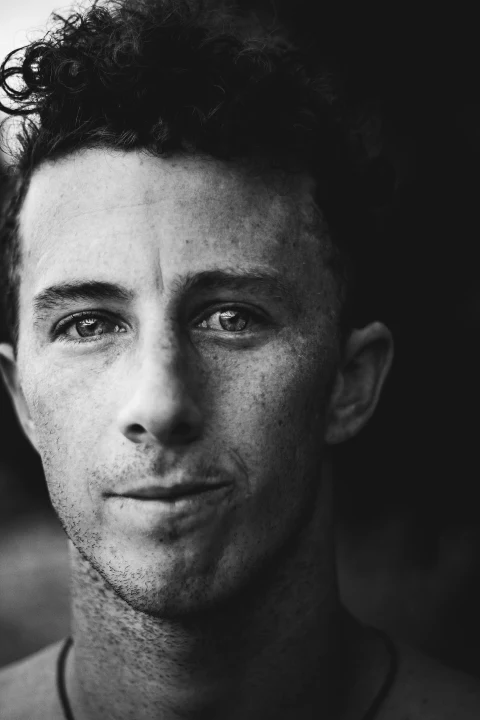
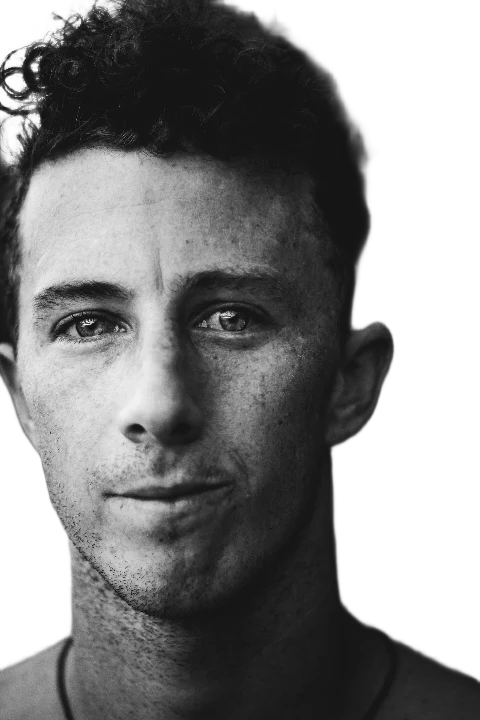
Photo: Jeremy Bishop, via Wikimedia Commons, CC0. Wikimedia Commons · CC0 1.0